
This article explains what automated subscriber uploads are, how to check whether setup is required for your institution, and how to get it done.
What Automated Subscriber Uploads Are
Automated Subscriber Uploads, also known as a Student Information Sync (SIS), is a process that syncs your student roster with uConnect on a scheduled basis. This ensures that when a student attempts to log in to your VCC, the platform recognizes them as a valid, active user.
Without this sync, students may encounter login errors or be treated as unrecognized users — even if SSO is configured. This is especially common for new students at the start of each term.
Our Official SIS Instructions: Our comprehensive instructions on how to set up Automated Subscriber Uploads (SIS) are outlined in this article so please refer here to fully implement this feature and upload your student data!
How to Check If Setup Is Required
You may already have it enabled, but you'll want to double-check first. The presence of the Automated Subscriber Uploads option in your admin dashboard is itself an indicator that action is needed:
- Log in to your admin dashboard
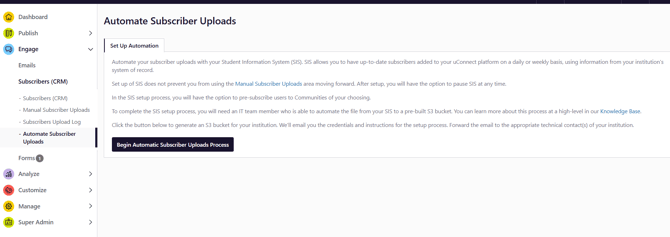
- Navigate to Engage → Subscribers → Automate Subscriber Uploads
- If this option is visible and has not yet been configured, setup is required for your institution. It will appear like the screenshot below:
Before You Begin: Loop in Your IT Team
Setting up automated subscriber uploads typically requires your institution's IT department to be involved. Before you start the setup process, connect with your IT team to:
- Confirm what format your student roster data is available in
- Determine how frequently uploads should run (daily is common; align with your enrollment update cycles)
- Establish who will own the ongoing process of keeping uploads current
Getting IT aligned early prevents delays. If you're not sure who the right IT contact is, start with your registrar's office or the team that manages your student information system.
Full Setup Instructions
Please read our detailed set up instructions for more step by step guidance!
Why This Matters for AI Search
Automated Subscriber Uploads directly impacts the quality of your AI Search data in two important ways:
- Student recognition at login — without an accurate, current subscriber list, students may not be recognized as authenticated users even when SSO is in place. This means they'd be limited to the 1-search guest experience rather than the full, personalized logged-in experience.
- Future Product Release: Engagement Score accuracy — Engagement Scores are only generated for logged-in, recognized users. If students can't be matched to a subscriber record, their activity is not attributed to them for reporting purposes.