
Our External Content Libraries provides two distinct search tools: Search Keywords and Search Categories. While they appear side-by-side on the same screen, they search different information in different ways. Understanding the distinction will help you get the results you expect.
Search Keywords
The Search Keywords field looks for your search term within a post's:
- Title
- Description
- Any additional text content associated with the post

How results are ordered
When you run a keyword search, results are not sorted by date added. Instead, the system prioritizes content whose title contains your search term, placing those at the top. Posts where the term only appears in the description will follow, but with no additional sorting applied among them — so two posts that both match will not necessarily appear in a predictable or consistent order relative to each other.
This is why a search for "resume" may not surface your most recently added resume-related content first: title matches are always prioritized, regardless of when a post was added.
View results by recency
Run your keyword search, then click the Date column header to re-sort the results chronologically. Clicking Date or Content (title) at any time will override the default relevance behavior and sort strictly by that column instead.

Search Categories
The Search Categories field works differently: rather than searching a post's title or description, it searches the category/metadata tags assigned to a post. These differ by provider and can be found in the “External Categories” column. Some providers do not supply category information.
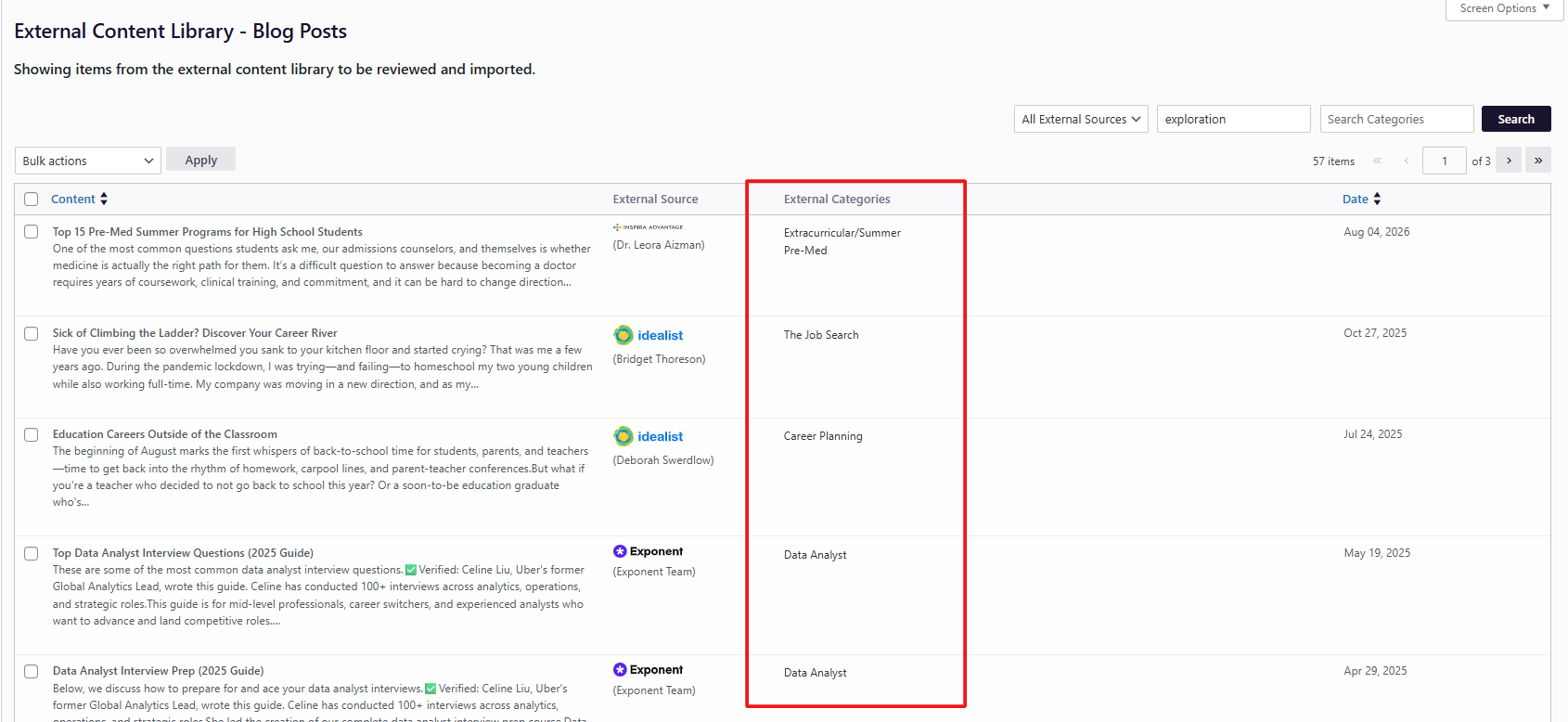
How it works
- Your search phrase is broken into individual words
- Up to the first 5 unique words are used (longest words first)
- A post will only appear in the results if it matches all of those words in its category metadata — this is a match-all, not match-any, search
When to use Search Categories instead of Search Keywords
Use Search Categories when:
- You want to find posts tagged under a specific topic or subject area, rather than posts that merely mention a word in passing
- You're looking for a more precise, curated result set (e.g., all videos categorized under "Resume Writing" and "Interview Prep") rather than a broad text match
- Your search phrase includes multiple qualifying words and you want posts that satisfy all of them, not just one
Use Search Keywords when:
- You want a broader search across a post's actual title and description text
- You're not sure of the exact category tagging and want to catch any mention of the term (especially helpful for providers without categories)
|
|
Search Keywords |
Search Categories |
|---|---|---|
|
Searches |
Title, description |
Category/metadata tags |
|
Match logic |
Any match (OR-like) |
All words must match (AND) |
|
Default order |
Title matches first, then no consistent order |
Same relevance behavior applies |
|
Sort by date |
Click "Date" column after searching |
Click "Date" column after searching |
|
Best for |
Broad/general search |
Precise, topic-based filtering |