
How Login Affects the AI Search Experience
AI Search is accessible to all visitors, but the experience is meaningfully different depending on whether a user is authenticated:
|
Guest (Not Logged In) • 1 search per session maximum • No personalized results • No search history saved • No Engagement Score contribution • SSO-protected content titles surface, but details stay hidden until login • After 1 search, prompted to log in |
|
Logged In • Unlimited searches • Personalized results based on role, graduation year, and community affiliations • Search history saved (student can delete at any time) • Activity contributes to Engagement Score • SSO-protected content fully accessible within permission scope |
How SSO-Protected Content Works
Some content on your VCC may be protected behind a login wall — for example, resume templates, appointment booking pages, or resources restricted to specific student populations. AI Search fully respects these permission boundaries.
- If a student is not authenticated, AI Search can still surface the title of SSO-protected content when it's relevant to their question. However, the agent will not display, summarize, or paraphrase any of the protected content itself — the student sees that a matching resource exists, and is encouraged to log in to view it.
- Once a student logs in, AI Search retrieves and surfaces the full content within their permission scope, just as they would be able to access it directly through the platform.
- Students log in using the same credentials they already use to access your VCC. No separate account is required.
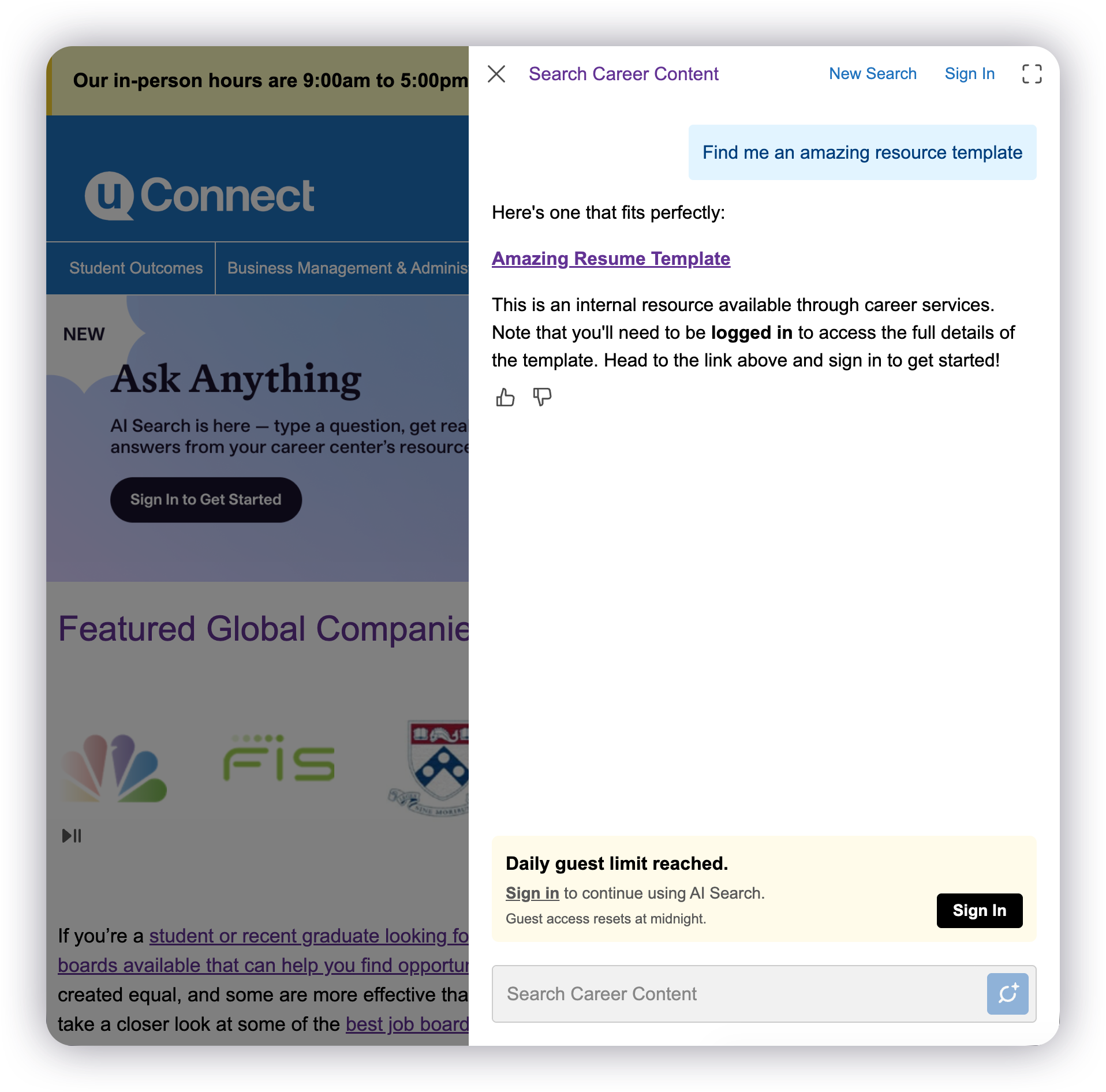
Pro Tip: Because guests can now see that a protected resource exists (just not its contents), surfaced titles act as a built-in login nudge. Naming your protected resources clearly and descriptively — e.g., "Resume Template for Business Majors" instead of "Template 3" — helps guests understand the value of logging in before they even see the full content.
Why SSO Is Strongly Recommended
Single Sign-On (SSO) is the most reliable way to ensure your students can log in seamlessly — and login is foundational to getting full value from AI Search. Here's what SSO makes possible:
- Higher login rates — when students can authenticate with their existing institutional credentials (no separate password to remember), login friction is dramatically reduced.
- Better engagement data — Engagement Scores are only generated for logged-in users. Without SSO, many students may use AI Search anonymously and their activity won't be captured.
- Personalized results — personalization only works for logged-in users. The more students who log in, the more tailored and useful their AI Search experience becomes.
There is no charge to set up SSO. If your institution doesn't have SSO configured yet or needs assistance, please read our SSO documentation first and then submit a support ticket to get started.
Non-Student Users
AI Search is not limited to students. Alumni, faculty, staff, and other users can also interact with the experience. Login flows for non-student users mirror your existing VCC workflows, so the authentication process is consistent regardless of who is accessing the platform.
|
Pro Tip: Even if SSO is not yet set up at your institution, encourage students to log in manually when they first access the VCC. A brief note in your adoption communications explaining the benefits of logging in (personalized results, saved history) can meaningfully increase your authenticated session rate. |