
You can filter the External Posts library to show only your preferred blog authors using the Screen Options panel. This lets you control which sources appear in the External Sources drop-down, saving time when browsing for content to publish. Follow the steps below to configure your preferences.
Step by Step Instructions:
Log into your admin dashboard.
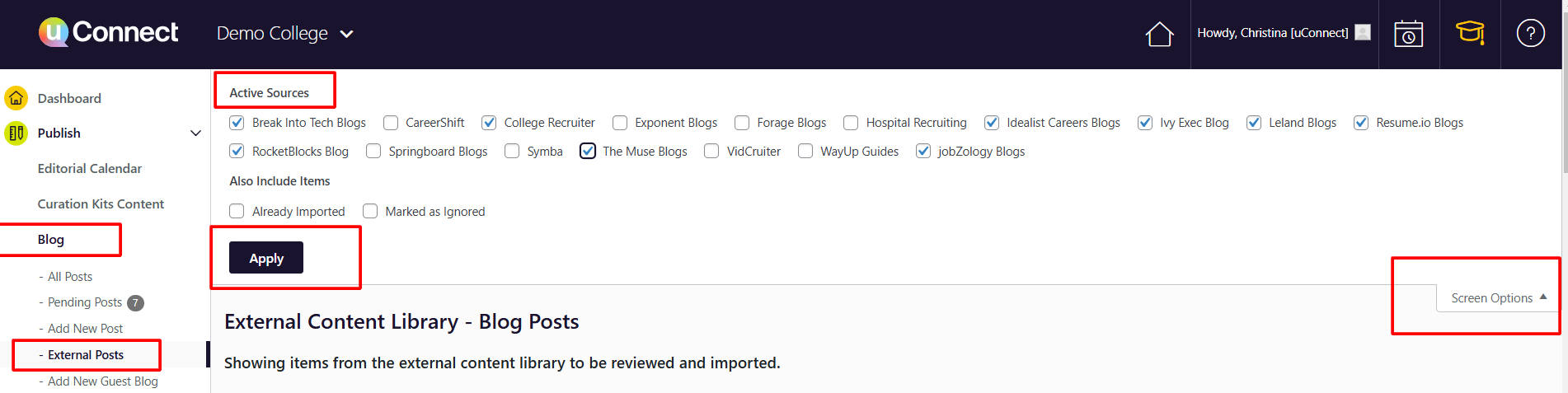
Click on Publish and then hover over Blog and then from the menu that appears. Click on the External Posts section.
Once the page loads, locate the Screen Options button in the top-right corner.
Click Screen Options to expand the panel, then select the authors you want to appear in the External Sources drop-down.
From here, check or uncheck which blog content providers you want to display moving forward now.
Click Apply to save your selections.
Now, your blog provider list is much shorter, making it that much easier to browse through what the latest content is from my favorite and preferred blog content providers.
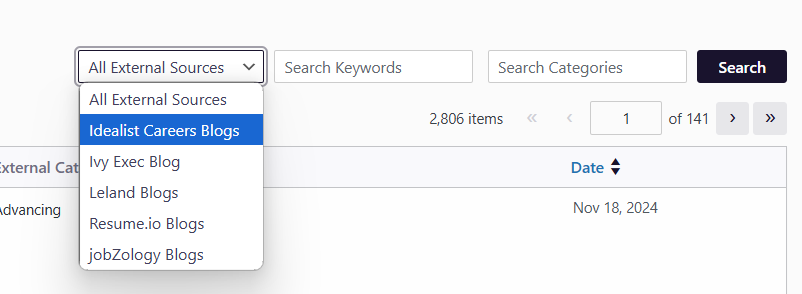
Use Screen Options to filter your preferred authors whenever you need to quickly find relevant content in the External Posts library.
Where else can I use Screen Options?
The Screen Options button is available on nearly every page in the platform. Each page surfaces settings specific to that content type, so it is worth checking whenever you start working in a new area. You will find it on pages including:
- Resources
- Experiences
- Classes