---
title: What is the hamburger menu button and how do I remove it on my primary navigation?
description: If you this hamburger menu button appears on your primary navigation, it means you have too many dropdown menus! Learn how to fix it below.
---
[](https://www.gouconnect.com/)
- [Knowledge Base](https://support.gouconnect.com/)
- [Career Everywhere](https://www.gouconnect.com/career-everywhere/)
- [Community](https://www.gouconnect.com/career-everywhere/community/access/)
- [Submit a Ticket](https://share.hsforms.com/10AUHU9-DRi-Bw3fdB-SUYA8bok)
- [Support Portal Login](https://support.gouconnect.com/_hcms/mem/login)
✕
## Submit a Ticket
Loading support form...
[Skip to content](https://support.gouconnect.com/articles/9967384-what-is-the-hamburger-menu-button-and-how-do-i-remove-it-on-my-primary-navigation#main-content)
Open main navigation
Close main navigation
What do you need help with today?
- There are no suggestions because the search field is empty.
1. [uConnect Knowledge Base](https://support.gouconnect.com/articles)
2. [Platform Design](https://support.gouconnect.com/articles/platform-design)
3. [Menus](https://support.gouconnect.com/articles/platform-design#menus)
# What is the hamburger menu button and how do I remove it on my primary navigation?
If your primary navigation menu is hiding some of your dropdowns, this is caused by you having too many dropdown menu items, and that is why the "hamburger menu button" appears. For the best user experience, we want to avoid the hamburger menu button from appearing, so let's learn more about what the hamburger menu is and how to remove it.
## What is a hamburger menu button?
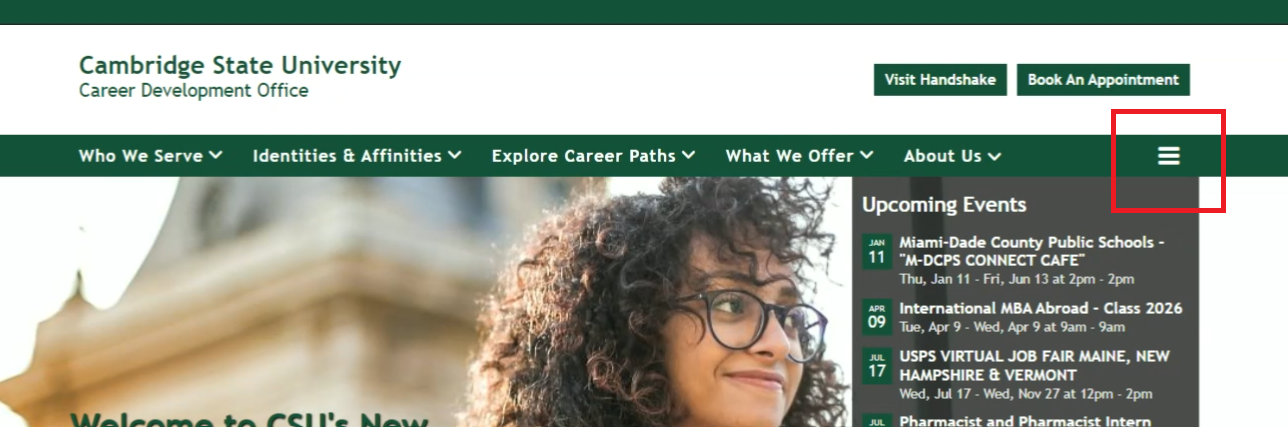
A hamburger menu button, often known as a drop-down menu or a hamburger button, is **a minimalist button consisting of three horizontal lines**. It is most often located in the upper left or right corner of a screen, and in this use case, it's located in the right corner of your primary navigation menu. The hamburger menu button toggles between displaying the menu options and hiding them behind a simple symbol, and it appears when there not all of the dropdown items can be displayed at once due to sizing and spacing.

## How do I remove it?
In short, all you have to do to remove the hamburger menu button is to **reduce the number of menu dropdowns in your primary navigation.**
We recommend try to keep your overall menu drop down sections to about **four to five** of them. It does vary depending on the size of your font and the style of your font, but when you start to exceed five or more, that's when this hamburger menu appears.
Watch this step-by-step video below that shows you how to remove the hamburger menu button:
## Video walkthrough
## Written instructions
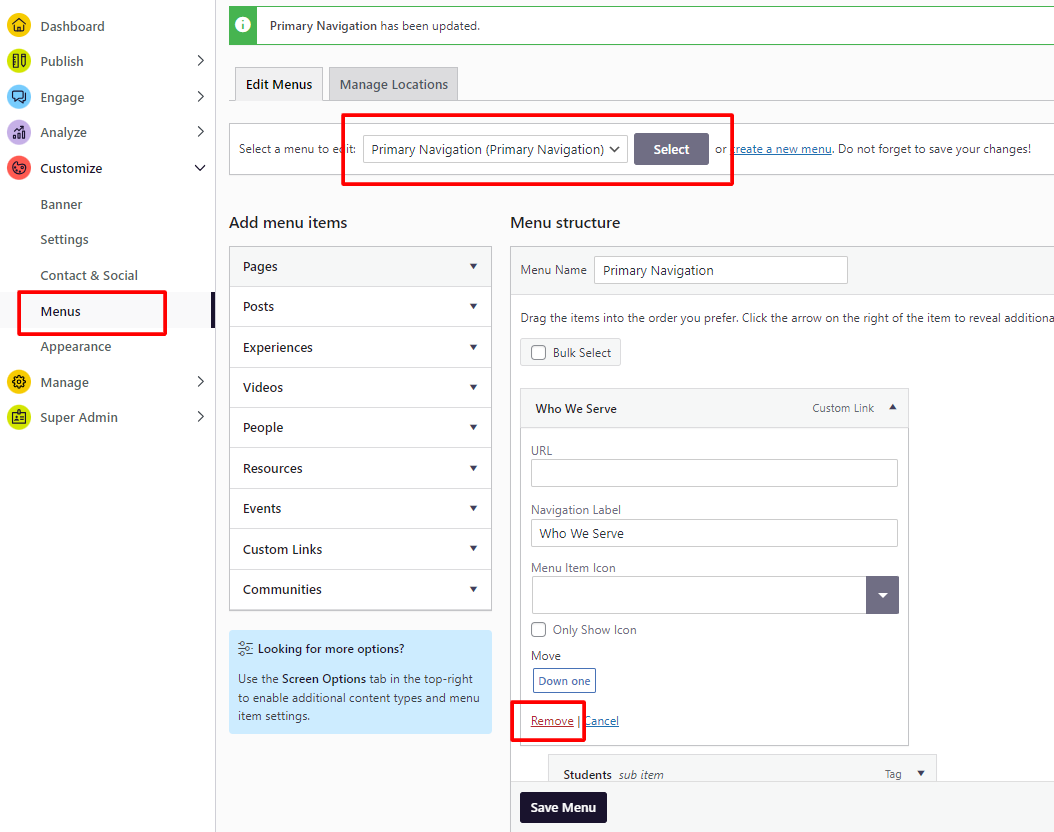
1. Log into your admin dashboard and navigate to **Customize\>Menus.**
2. You'll want to make sure that you first select your primary navigation menu; make sure that's clicked and then you hit "Select." Then that will cause your menu to appear.
3. You'll then see all of the subsequent menu items with the menu headings for each dropdown and the subsequent items within each.
4. Identify if you are going to remove the additional menu items or reorganize them somewhere else in your primary menu
5. If you decide to remove them, just simply click on each one and then click the "Remove" link in the bottom left corner of the screen that appears
6. If you decide to reorganize them, just simply click on the menu item and drag it a new location within your primary navigation
7. Finally, click "Save Menu" in the bottom left corner
*If you still have trouble fixing your primary navigation menu, [please don't hesitate to submit a support](https://share.hsforms.com/10AUHU9-DRi-Bw3fdB-SUYA8bok)request and choose "Menus" from the form dropdown.*
- [Get Started](https://support.gouconnect.com/articles/get-started)
- [AI Search](https://support.gouconnect.com/articles/ai-search)
- [Analytics & Data](https://support.gouconnect.com/articles/analytics-data#main-content)
- [Outcomes Data](https://support.gouconnect.com/articles/analytics-data#outcomes-data)
- [Platform Analytics](https://support.gouconnect.com/articles/analytics-data#platform-analytics)
- [Google Analytics](https://support.gouconnect.com/articles/analytics-data#google-analytics)
- [Publish Content](https://support.gouconnect.com/articles/publish-content)
- [Manage Your Communities & Content Categories](https://support.gouconnect.com/articles/manage-your-communities-content-categories#main-content)
- [Communities](https://support.gouconnect.com/articles/manage-your-communities-content-categories#communities)
- [Content Categories](https://support.gouconnect.com/articles/manage-your-communities-content-categories#content-categories)
- [Manage Subscribers & Users](https://support.gouconnect.com/articles/manage-subscribers-users)
- [Platform Design](https://support.gouconnect.com/articles/platform-design#main-content)
- [Widgets](https://support.gouconnect.com/articles/platform-design#widgets)
- [Block Editor (WordPress)](https://support.gouconnect.com/articles/platform-design#block-editor-wordpress)
- [Menus](https://support.gouconnect.com/articles/platform-design#menus)
- [Accessibility Hub](https://support.gouconnect.com/articles/accessibility-hub#main-content)
- [Block Editor](https://support.gouconnect.com/articles/accessibility-hub#block-editor)
- [Market Your Platform](https://support.gouconnect.com/articles/market-your-platform#main-content)
- [Activation and Promotion Guides](https://support.gouconnect.com/articles/market-your-platform#activation-and-promotion-guides)
- [Modules & Integrations](https://support.gouconnect.com/articles/modules-integrations#main-content)
- [Outcomes Data Visualization](https://support.gouconnect.com/articles/modules-integrations#outcomes-data-visualization)
- [Technical Configurations](https://support.gouconnect.com/articles/technical-configurations#main-content)
- [Automated Subscriber Uploads (SIS)](https://support.gouconnect.com/articles/technical-configurations#automated-subscriber-uploads-sis)
- [Product Updates](https://support.gouconnect.com/articles/product-updates)
- [Customer Training Recordings](https://support.gouconnect.com/articles/customer-training-recordings)
- [Candid Career+](https://support.gouconnect.com/articles/candid-career)
- [General](https://support.gouconnect.com/articles/general)
[](https://www.gouconnect.com/)
- [Customers](https://www.gouconnect.com/customers/)
- [Case Studies](https://www.gouconnect.com/customers/case-studies/)
- [Client Directory](https://www.gouconnect.com/customers/client-directory/)
- [Testimonials](https://www.gouconnect.com/customers/testimonials/)
- [Product](https://www.gouconnect.com/product/)
- [Use Cases](https://www.gouconnect.com/product/use-cases/)
- [Integrations](https://www.gouconnect.com/product/integrations/)
- [Become a Partner](https://www.gouconnect.com/company/partner/)
- [Company](https://www.gouconnect.com/company/)
- [Careers](https://www.gouconnect.com/company/careers/)
- [News](https://www.gouconnect.com/company/news/)
- [Status Page](https://status.gouconnect.com/)
- [Career Everywhere](https://www.gouconnect.com/career-everywhere/)
- [The Movement](https://www.gouconnect.com/career-everywhere/movement/)
- [Community](https://www.gouconnect.com/career-everywhere/community/access/)
- [Podcast](https://www.gouconnect.com/career-everywhere/podcast/)
© 2026 uConnect Inc.
[Accessibility Policy](https://www.gouconnect.com/accessibility-policy/) · [Privacy Policy](https://www.gouconnect.com/privacy-policy/)