---
title: Create a hero community menu navigation that links to widgets
description: Learn how you can build a customized hero community navigation menu for your communities and pages
---
[](https://www.gouconnect.com/)
- [Knowledge Base](https://support.gouconnect.com/)
- [Career Everywhere](https://www.gouconnect.com/career-everywhere/)
- [Community](https://www.gouconnect.com/career-everywhere/community/access/)
- [Submit a Ticket](https://share.hsforms.com/10AUHU9-DRi-Bw3fdB-SUYA8bok)
- [Support Portal Login](https://support.gouconnect.com/_hcms/mem/login)
✕
## Submit a Ticket
Loading support form...
[Skip to content](https://support.gouconnect.com/articles/9367885-create-a-hero-community-menu-navigation-that-links-to-widgets#main-content)
Open main navigation
Close main navigation
What do you need help with today?
- There are no suggestions because the search field is empty.
1. [uConnect Knowledge Base](https://support.gouconnect.com/articles)
2. [Platform Design](https://support.gouconnect.com/articles/platform-design)
3. [Menus](https://support.gouconnect.com/articles/platform-design#menus)
# Create a hero community menu navigation that links to widgets
On a uConnect Community page, you will typically have multiple widgets displaying different types of curated, dynamic content. To help users quickly see what content is available and navigate to it, we recommend using a hero community navigation menu, as seen in the image below:
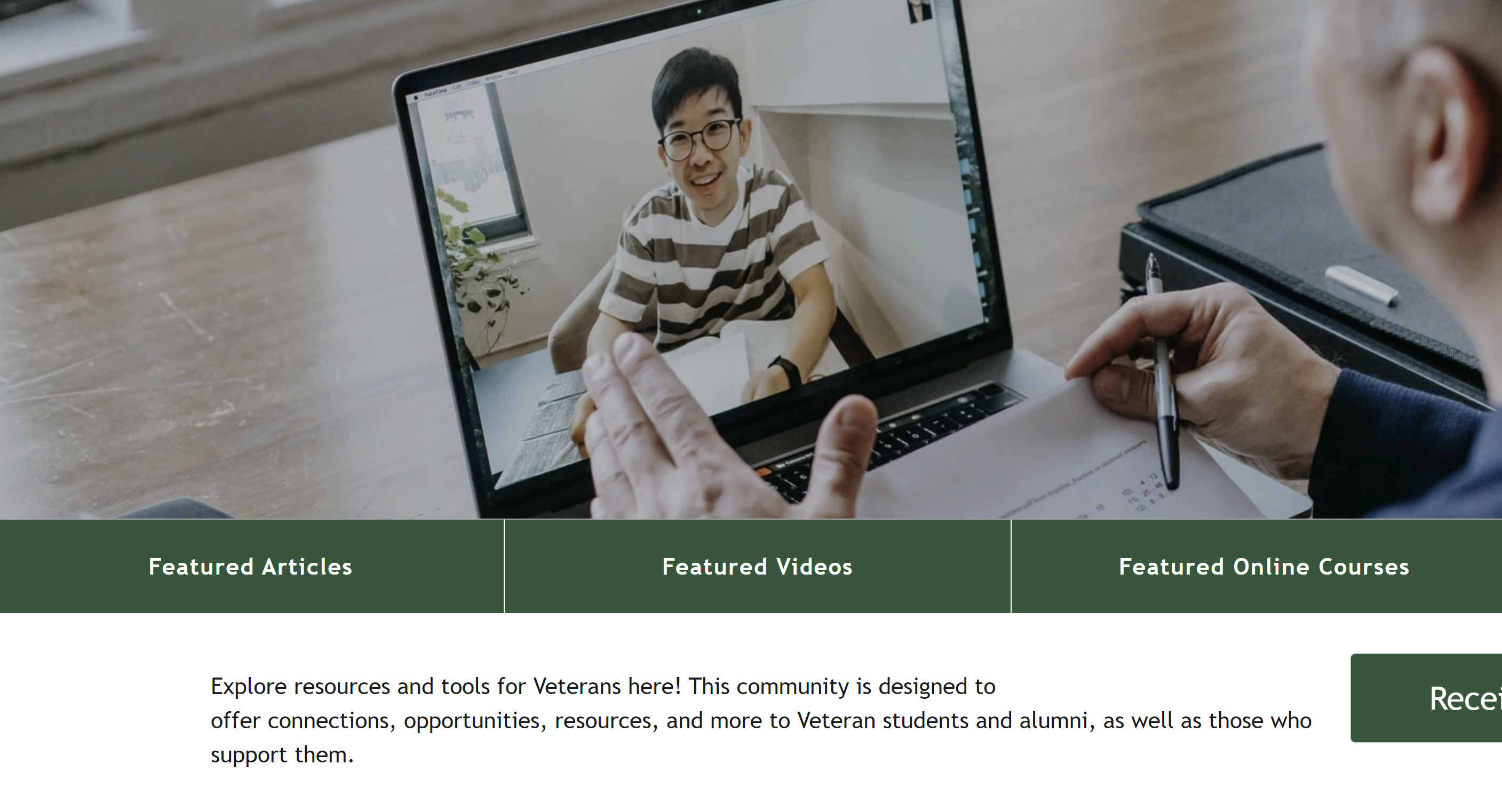
A hero navigation menu displays below your header image and allows users to select a menu item to jump directly to a specific widget on the Community. This article walks you through how to build a hero community navigation menu for your Communities.
Please Note: If you are creating a hero community navigation menu that you'd like to anchor to **a section heading, button, or specific text on a page**, and not a widget, **[follow these instructions](https://support.gouconnect.com/articles/9977187-create-a-hero-community-navigation-menu-that-anchors-to-content-on-your-page)**to create another anchor link experience!
## Step-by-step instructions
1. #### **Navigate to Customize \> Menus.**
2. #### **Select 'create a new menu' next to the menu dropdown. We recommend adding the name of the page in the menu title. Example: Career Community Navigation**
**Please note:** it is very likely that you will already have a Hero Community Navigation menu built for you. If that is the case, consider if you would just like to edit that existing menu as Community Hero Navigations are dynamic and will only show a button for a widget if that widget is appearing on that page, for example, the LinkedIn Learning button would only appear if you have a widget already displaying LinkedIn Learning courses on that Community, you are typically able to use one Community Hero Navigation across all Communities.
#### 3. From the 'Add menu items' left-hand sidebar, expand the 'Custom Link' field.
#### 4. Here, you will want to add the widget ID that corresponds to the widgets that are appearing on your Community.
To do this, make sure you are logged into your uConnect platform. To find the widget ID, navigate to the front-end of your Community (the URL you would share with a student or colleague). From there, ensure that **Show Widget IDs** is checked in the top ribbon of your platform, as shown in the screenshot below.
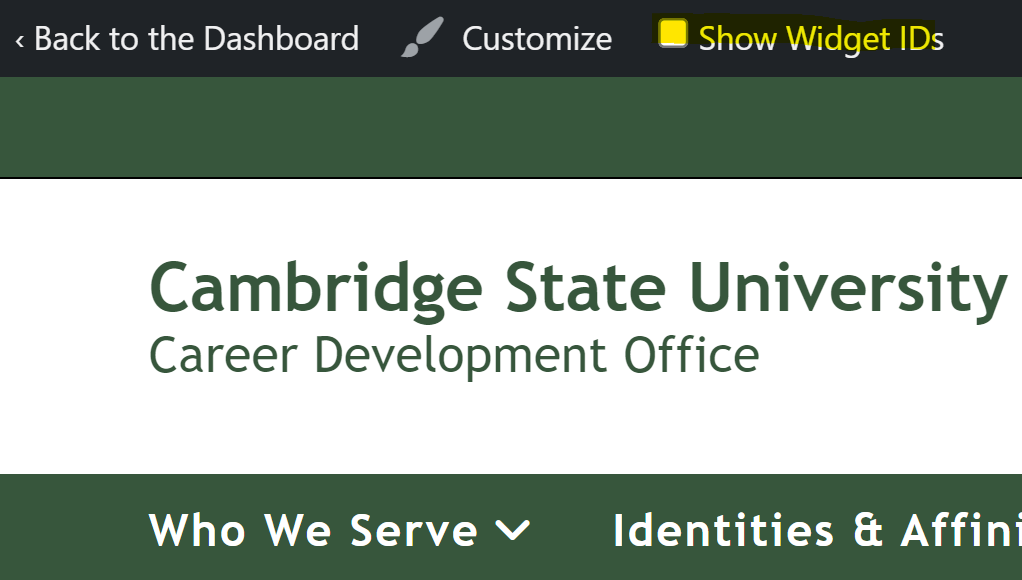
With **Show Widget IDs** enabled, widget IDs will appear automatically on all widgets. Navigate to the Community page containing the widget you want to add to your menu. Hover over that widget and click **Copy** to copy its ID.
Once your widget ID is copied, you can uncheck the 'Show Widget IDs' checkbox if you would like to not view the IDs.
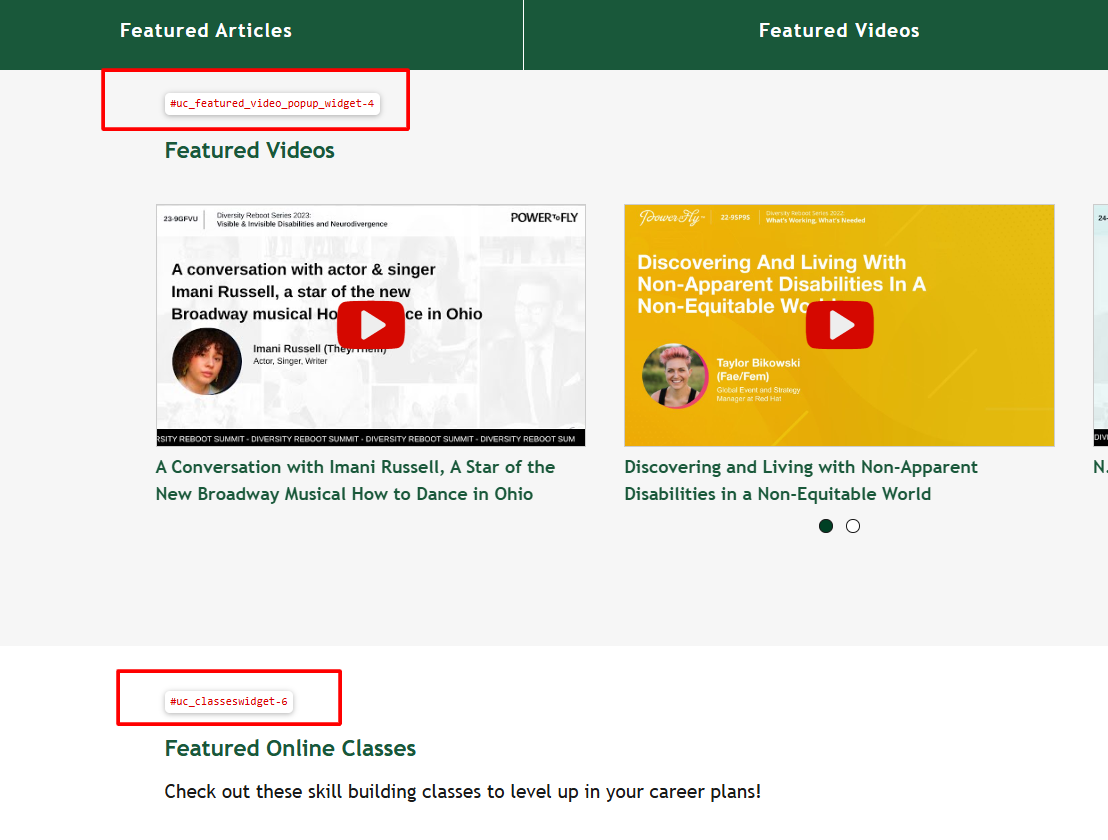
**Pro tip:** The typical format for a widget ID is `#uc_[content_type]-[ID number]`, such as `#uc_resource_tiles-2`, as shown in the example screenshot above.
#### 5. Add the widget ID to your Menu by using the Custom Link menu item
Important: Always use the "Custom Link" menu item when adding anchor buttons for widgets in your Hero Community Navigation Menu! If you don't see this option under "Add menu items," open up your "Screen Options" in the top right corner to enable it.
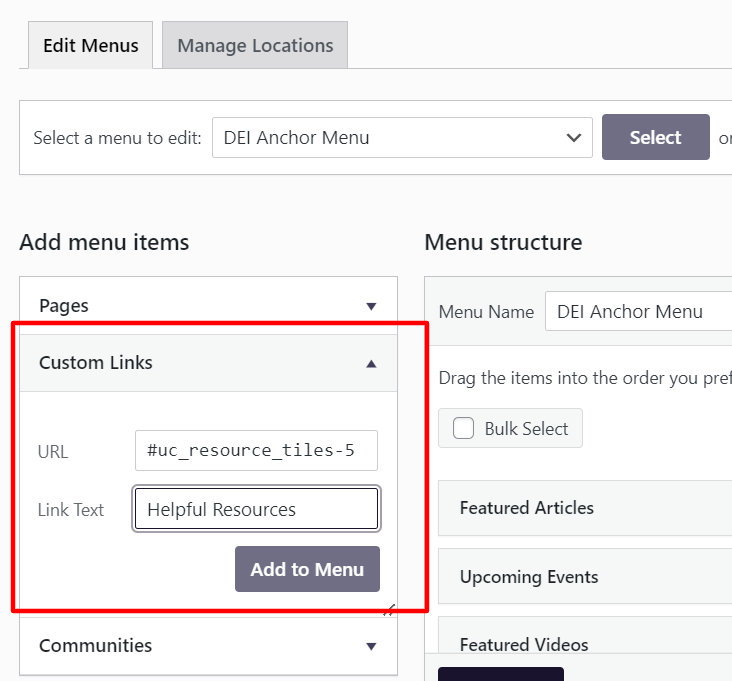
Now that you have copied your widget ID, return to **Customize \> Menus**. Under **Add menu items**, click **Custom Links**, then paste your widget ID into the **URL** field. Enter the name of your button in the **Link Text** field.
Example:
- URL: #uc\_resource\_tiles-5
- Link Text: Helpful Resources
#### 6. Add as many other menu items as needed, and hit 'Save Menu!' at the bottom of your screen
#### 7. If this is a new Hero Community Navigation menu you've just built, submit a request to activate it and take your menu live.
If you have created a new menu (rather than editing an existing one), use the [widget request form](https://clients.gouconnect.com/submit-your-widget-request/) to ask our Support Team to activate it for you. In your request, include: the name of your new menu, and the Communities you want it to appear on. The Support Team will follow up once the menu has been activated.
Still Have Questions?
If you're having difficulties in adding or updating a menu you can reach our Support team using the button below:
[Contact Our Support Team](https://share.hsforms.com/10AUHU9-DRi-Bw3fdB-SUYA8bok?form_link_page=Updating%20your%20public%20URL%20post-launch)
- [Get Started](https://support.gouconnect.com/articles/get-started)
- [AI Search](https://support.gouconnect.com/articles/ai-search)
- [Analytics & Data](https://support.gouconnect.com/articles/analytics-data#main-content)
- [Outcomes Data](https://support.gouconnect.com/articles/analytics-data#outcomes-data)
- [Platform Analytics](https://support.gouconnect.com/articles/analytics-data#platform-analytics)
- [Google Analytics](https://support.gouconnect.com/articles/analytics-data#google-analytics)
- [Publish Content](https://support.gouconnect.com/articles/publish-content)
- [Manage Your Communities & Content Categories](https://support.gouconnect.com/articles/manage-your-communities-content-categories#main-content)
- [Communities](https://support.gouconnect.com/articles/manage-your-communities-content-categories#communities)
- [Content Categories](https://support.gouconnect.com/articles/manage-your-communities-content-categories#content-categories)
- [Manage Subscribers & Users](https://support.gouconnect.com/articles/manage-subscribers-users)
- [Platform Design](https://support.gouconnect.com/articles/platform-design#main-content)
- [Widgets](https://support.gouconnect.com/articles/platform-design#widgets)
- [Block Editor (WordPress)](https://support.gouconnect.com/articles/platform-design#block-editor-wordpress)
- [Menus](https://support.gouconnect.com/articles/platform-design#menus)
- [Accessibility Hub](https://support.gouconnect.com/articles/accessibility-hub#main-content)
- [Block Editor](https://support.gouconnect.com/articles/accessibility-hub#block-editor)
- [Market Your Platform](https://support.gouconnect.com/articles/market-your-platform#main-content)
- [Activation and Promotion Guides](https://support.gouconnect.com/articles/market-your-platform#activation-and-promotion-guides)
- [Modules & Integrations](https://support.gouconnect.com/articles/modules-integrations#main-content)
- [Outcomes Data Visualization](https://support.gouconnect.com/articles/modules-integrations#outcomes-data-visualization)
- [Technical Configurations](https://support.gouconnect.com/articles/technical-configurations#main-content)
- [Automated Subscriber Uploads (SIS)](https://support.gouconnect.com/articles/technical-configurations#automated-subscriber-uploads-sis)
- [Product Updates](https://support.gouconnect.com/articles/product-updates)
- [Customer Training Recordings](https://support.gouconnect.com/articles/customer-training-recordings)
- [Candid Career+](https://support.gouconnect.com/articles/candid-career)
- [General](https://support.gouconnect.com/articles/general)
[](https://www.gouconnect.com/)
- [Customers](https://www.gouconnect.com/customers/)
- [Case Studies](https://www.gouconnect.com/customers/case-studies/)
- [Client Directory](https://www.gouconnect.com/customers/client-directory/)
- [Testimonials](https://www.gouconnect.com/customers/testimonials/)
- [Product](https://www.gouconnect.com/product/)
- [Use Cases](https://www.gouconnect.com/product/use-cases/)
- [Integrations](https://www.gouconnect.com/product/integrations/)
- [Become a Partner](https://www.gouconnect.com/company/partner/)
- [Company](https://www.gouconnect.com/company/)
- [Careers](https://www.gouconnect.com/company/careers/)
- [News](https://www.gouconnect.com/company/news/)
- [Status Page](https://status.gouconnect.com/)
- [Career Everywhere](https://www.gouconnect.com/career-everywhere/)
- [The Movement](https://www.gouconnect.com/career-everywhere/movement/)
- [Community](https://www.gouconnect.com/career-everywhere/community/access/)
- [Podcast](https://www.gouconnect.com/career-everywhere/podcast/)
© 2026 uConnect Inc.
[Accessibility Policy](https://www.gouconnect.com/accessibility-policy/) · [Privacy Policy](https://www.gouconnect.com/privacy-policy/)