---
title: Format your content on the legacy editor with some basic coding tricks
description: Learn how to add font colors, text sizes, anchor links and more on the legacy editor!
---
[](https://www.gouconnect.com/)
- [Knowledge Base](https://support.gouconnect.com/)
- [Career Everywhere](https://www.gouconnect.com/career-everywhere/)
- [Community](https://www.gouconnect.com/career-everywhere/community/access/)
- [Submit a Ticket](https://share.hsforms.com/10AUHU9-DRi-Bw3fdB-SUYA8bok)
- [Support Portal Login](https://support.gouconnect.com/_hcms/mem/login)
✕
## Submit a Ticket
Loading support form...
[Skip to content](https://support.gouconnect.com/articles/2331597-format-your-content-on-the-legacy-editor-with-some-basic-coding-tricks#main-content)
Open main navigation
Close main navigation
What do you need help with today?
- There are no suggestions because the search field is empty.
1. [uConnect Knowledge Base](https://support.gouconnect.com/articles)
2. [Platform Design](https://support.gouconnect.com/articles/platform-design)
# Format your content on the legacy editor with some basic coding tricks
Formatting your content is a great way to add flair and style to your platform. This article covers a few easy HTML and CSS tricks to help you customize text formatting in the classic/legacy editor — no prior coding experience needed.
# Where the coding happens:
If your screen looks like the below when you're adding content to a blog post, custom page, resource, or Community static content, you're on the legacy/classic editor. Formatting your content can be done wherever you see this option:
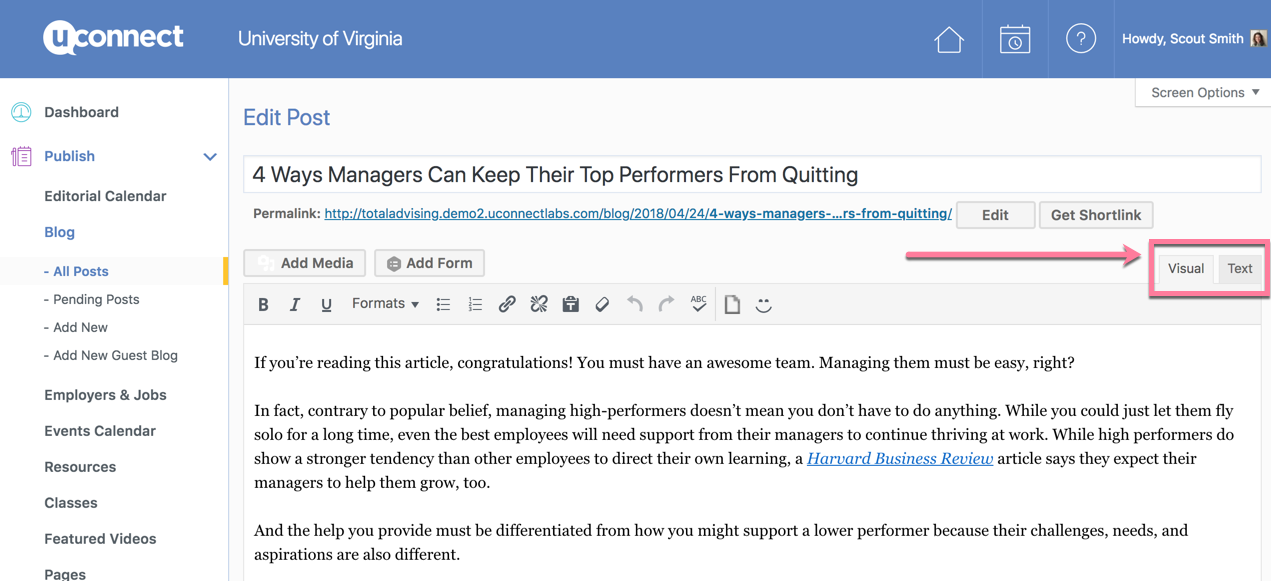
'**Visual**' is the default editor of any content you add. The '**Text**' version, is where the coding fun happens! This shows the back-end, HTML code that creates the visual presentation you see on the front-end.
# The most important thing to note:
Any code you add must be **exactly right.** Forgetting even a comma or bracket can throw off an entire page. It's important to be detail oriented when adding any customizations here.
Any styling you want to add must be placed within quotation marks inside the tag surrounding your text — for example: `text` — otherwise it won't apply. For example, in the 'text' editor, if you'd like to edit a title, you might see:
# This is a title!
The 'h1' indicates that the text surrounded by the brackets follows the 'Header 1' formatting.
# To add color:
If you want to add style to the formatting, you'd include something like this:
# This is a title!
This tells the system that the text between the
# and
will display in the color identified by the Hex code you included. (A hex code is a 6 number / letter combination that specifies a unique color in the color wheel. Here's a [color picker tool](https://htmlcolorcodes.com/color-picker/) where you can find the hex code you want to use.)
In addition to color, all kinds of attributes can be added within the **style=" "** section of your text, to further change your formatting. Just remember to keep it within the quotations!
# Other formatting options:
- To center align your text: **style="text-align: center;"**
- To make your text all uppercase: **style="text-transform: uppercase;"**
- To add spacing between the characters of your text: **style="letter-spacing: 3px;"** (the higher the number you include here, the more spaced out your letters will be)
- To make your text larger: **style="font-size: 24px"** (you can replace with a different number, for different sizing)
- To add a horizontal line, add
---
in its own line.
Remember, if not done correctly, adding any custom code can cause visible formatting issues on your front-end. Make sure to double-check that your code looks the way you want by previewing your pages before publishing. And as always, if you need help - feel free to reach out to us at [support@gouconnect.com](mailto:support@gouconnect.com). 😁
# Check out this tutorial video for a visual demonstration of how to create your own coded content:
Use [this color conversion tool](https://htmlcolorcodes.com/) to convert CMYK and RGB colors into hex codes.
If you notice that your screen looks different as you're editing a blog post, custom page, resource, or Community static content, you're likely on the latest version of the editor, called the block editor! You'll find an example of what this looks like below:
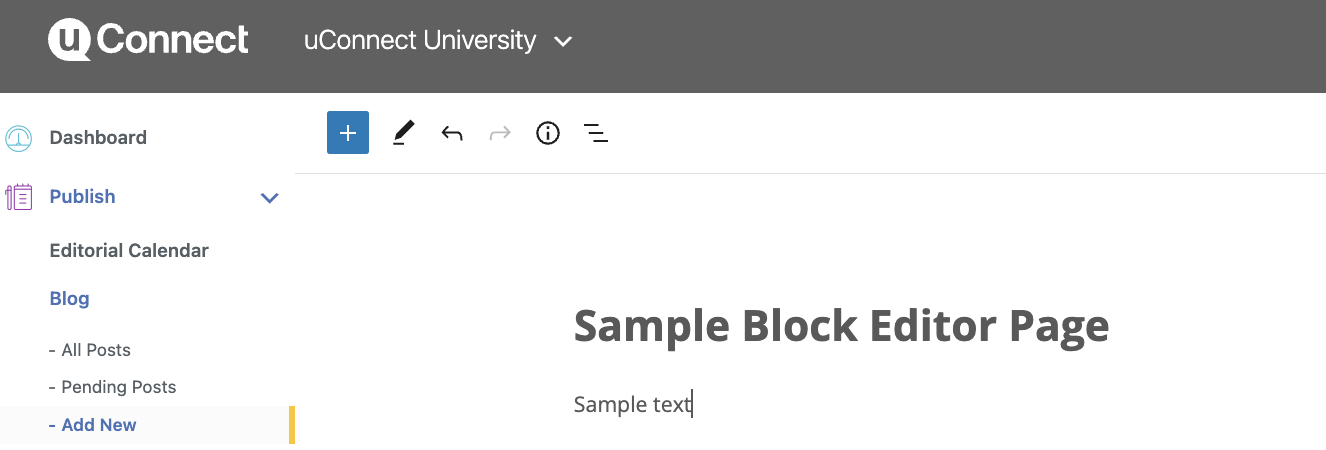
The key differences you may notice above are that there's no longer a text/visual tab, and you now have a blue plus sign in the top left as you're editing content on the block editor.
Through the block editor, you have the ability to add text color and other formatting options without having to code!
Instead, you can take advantage of sidebar options to change colors:
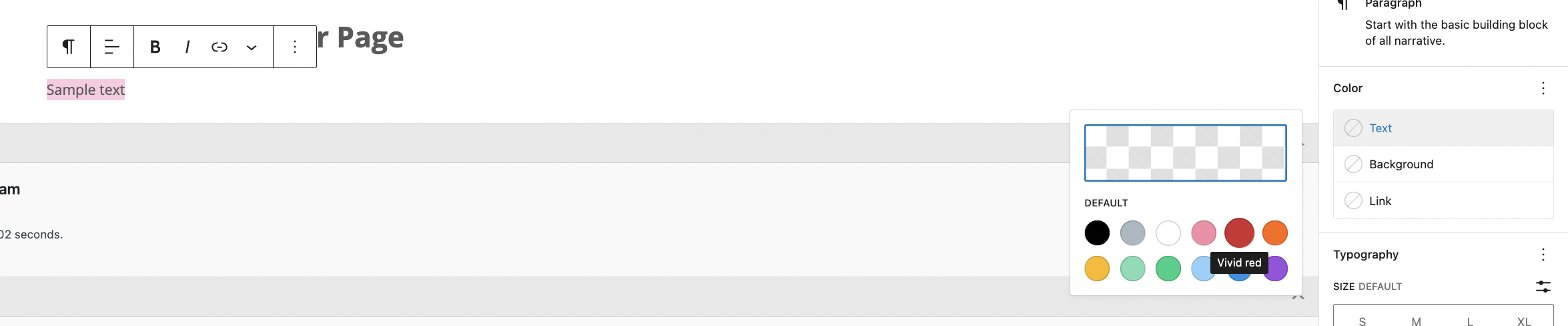
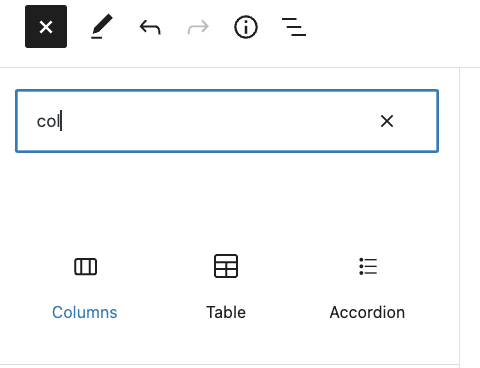
Or, for assistance in choosing a desired format for the text on your page, you can use the blue plus sign to scroll for 'blocks' or ways to format your content without needing to add any code:
For questions on the above, [please reach out to us](https://share.hsforms.com/10AUHU9-DRi-Bw3fdB-SUYA8bok?form_link_page=Format%20your%20content%20on%20the%20legacy%20editor%20with%20some%20basic%20coding%20tricks) and a team member would be happy to help!
- [Get Started](https://support.gouconnect.com/articles/get-started)
- [AI Search](https://support.gouconnect.com/articles/ai-search)
- [Analytics & Data](https://support.gouconnect.com/articles/analytics-data#main-content)
- [Outcomes Data](https://support.gouconnect.com/articles/analytics-data#outcomes-data)
- [Platform Analytics](https://support.gouconnect.com/articles/analytics-data#platform-analytics)
- [Google Analytics](https://support.gouconnect.com/articles/analytics-data#google-analytics)
- [Publish Content](https://support.gouconnect.com/articles/publish-content)
- [Manage Your Communities & Content Categories](https://support.gouconnect.com/articles/manage-your-communities-content-categories#main-content)
- [Communities](https://support.gouconnect.com/articles/manage-your-communities-content-categories#communities)
- [Content Categories](https://support.gouconnect.com/articles/manage-your-communities-content-categories#content-categories)
- [Manage Subscribers & Users](https://support.gouconnect.com/articles/manage-subscribers-users)
- [Platform Design](https://support.gouconnect.com/articles/platform-design#main-content)
- [Widgets](https://support.gouconnect.com/articles/platform-design#widgets)
- [Block Editor (WordPress)](https://support.gouconnect.com/articles/platform-design#block-editor-wordpress)
- [Menus](https://support.gouconnect.com/articles/platform-design#menus)
- [Accessibility Hub](https://support.gouconnect.com/articles/accessibility-hub#main-content)
- [Block Editor](https://support.gouconnect.com/articles/accessibility-hub#block-editor)
- [Market Your Platform](https://support.gouconnect.com/articles/market-your-platform#main-content)
- [Activation and Promotion Guides](https://support.gouconnect.com/articles/market-your-platform#activation-and-promotion-guides)
- [Modules & Integrations](https://support.gouconnect.com/articles/modules-integrations#main-content)
- [Outcomes Data Visualization](https://support.gouconnect.com/articles/modules-integrations#outcomes-data-visualization)
- [Technical Configurations](https://support.gouconnect.com/articles/technical-configurations#main-content)
- [Automated Subscriber Uploads (SIS)](https://support.gouconnect.com/articles/technical-configurations#automated-subscriber-uploads-sis)
- [Product Updates](https://support.gouconnect.com/articles/product-updates)
- [Customer Training Recordings](https://support.gouconnect.com/articles/customer-training-recordings)
- [Candid Career+](https://support.gouconnect.com/articles/candid-career)
- [General](https://support.gouconnect.com/articles/general)
[](https://www.gouconnect.com/)
- [Customers](https://www.gouconnect.com/customers/)
- [Case Studies](https://www.gouconnect.com/customers/case-studies/)
- [Client Directory](https://www.gouconnect.com/customers/client-directory/)
- [Testimonials](https://www.gouconnect.com/customers/testimonials/)
- [Product](https://www.gouconnect.com/product/)
- [Use Cases](https://www.gouconnect.com/product/use-cases/)
- [Integrations](https://www.gouconnect.com/product/integrations/)
- [Become a Partner](https://www.gouconnect.com/company/partner/)
- [Company](https://www.gouconnect.com/company/)
- [Careers](https://www.gouconnect.com/company/careers/)
- [News](https://www.gouconnect.com/company/news/)
- [Status Page](https://status.gouconnect.com/)
- [Career Everywhere](https://www.gouconnect.com/career-everywhere/)
- [The Movement](https://www.gouconnect.com/career-everywhere/movement/)
- [Community](https://www.gouconnect.com/career-everywhere/community/access/)
- [Podcast](https://www.gouconnect.com/career-everywhere/podcast/)
© 2026 uConnect Inc.
[Accessibility Policy](https://www.gouconnect.com/accessibility-policy/) · [Privacy Policy](https://www.gouconnect.com/privacy-policy/)