---
title: Hide a Community from the front-end of your site
description: Remove a Community from the front-end of your site without deleting it entirely.
---
[](https://www.gouconnect.com/)
- [Knowledge Base](https://support.gouconnect.com/)
- [Career Everywhere](https://www.gouconnect.com/career-everywhere/)
- [Community](https://www.gouconnect.com/career-everywhere/community/access/)
- [Submit a Ticket](https://share.hsforms.com/10AUHU9-DRi-Bw3fdB-SUYA8bok)
- [Support Portal Login](https://support.gouconnect.com/_hcms/mem/login)
✕
## Submit a Ticket
Loading support form...
[Skip to content](https://support.gouconnect.com/articles/1996061-hide-a-community-from-the-front-end-of-your-site#main-content)
Open main navigation
Close main navigation
What do you need help with today?
- There are no suggestions because the search field is empty.
1. [uConnect Knowledge Base](https://support.gouconnect.com/articles)
2. [Manage Your Communities & Content Categories](https://support.gouconnect.com/articles/manage-your-communities-content-categories)
3. [Communities](https://support.gouconnect.com/articles/manage-your-communities-content-categories#communities)
# Hide a Community from the front-end of your site
This article will walk you through the steps to hide community pages from the front end of your platform, allowing you to work on them privately without users being able to access or view the pages.
## Step 1: Decide the Level of Visibility
Before proceeding, determine how hidden you want the community page to be. For example, you may want to:
- Remove the page from the main menu.
- Hide any related tags throughout the platform.
- Prevent users from signing up for content related to the community page.
**Important**: If you want to complete hide but NOT delete a Community page from the front end of your platform, you will need to remove it from any menus (especially your primary/main menu) under ***Customize\>Menus*** AND limit the visibility settings under ***Manage\>Communities.***
### Video Example: Finance Career Community Page
In this video, we use the example of a "Finance Career" community page that needs to be hidden while you work on it.
## Step 2: Remove the Page from the Main Menu
To hide the page from the main menu:
1\. Log into your admin dashboard.
2\. Navigate to the ***Customize\>Menu*** section in the left-hand menu.
3\. Select the menu that contains the community page (e.g., the "Primary Main Navigation Menu") from the dropdown, then click "***Select***."
4\. Scroll down to locate the community page (e.g., "Finance Career").
5\. Expand the item, click "***Remove***", and then click "***Save Menu***."
At this point, the page will no longer appear in the main menu, preventing your stakeholders from easily accessing it.
## Step 3: Adjust Visibility Settings
To further limit access:
1\. Go to the ***Manage\>Communities*** section in your dashboard.
2\. Search for the community page you wish to hide (e.g., "Finance Career") using the search bar.
3\. Click "***Edit***" on the selected community page.
4\. Scroll down to the ***Visibility and Filters*** section.
5\. Adjust the following settings:
\- Set ***Global Visibility*** to "***Hidden***."
\- Hide the page from ***Filters***.
\- Hide the page from ***Alert Sign-up*** options.
6\. Scroll down and click ***Update*** to save your changes.
### Impact of Visibility Adjustments
- **Global Visibility**: The page cannot be tagged in any new content.
- **Filter Visibility**: The page will no longer appear as a filter option for users browsing content (e.g., jobs, events, resources).
- **Alert Sign-Up**: Users will not see the page as an option when signing up or updating preferences.
## Step 4: Change Page URL & Remove Additional Links
To fully prevent access, you should change the URL of the community page to ensure no one can visit the page who may have saved it off previously, and then ensure that the community page is not linked anywhere else on the platform, such as:
- Buttons
- Hero/community menus
- Other internal pages
To change the URL, navigate to ***Manage\>Communities***, find the Community page by searching for it in the right-side search bar, click "**Edit**" on the Community page, and finally update the **URL (Slug)** section to include a new URL:
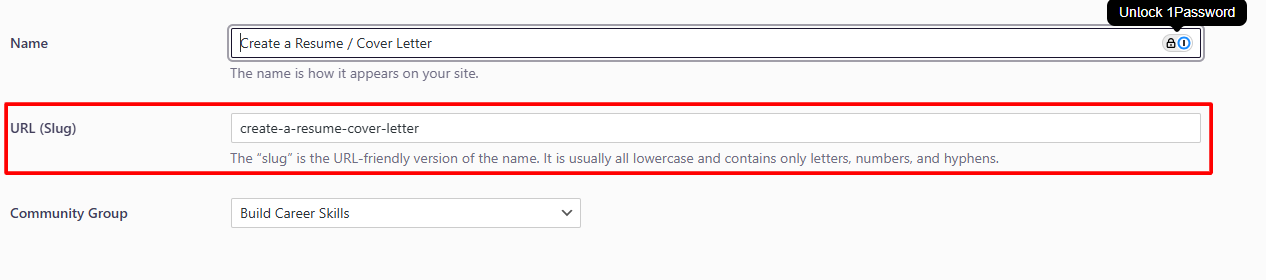
Lastly, check all potential links throughout your platform and remove them to complete the hiding process.
---
**It is important to note that community pages cannot be unpublished or saved as drafts.** They are either public or hidden. Do not delete community pages unless absolutely necessary, as deleted pages cannot be restored. By following these steps, you can effectively hide a community page from your platform’s front end, ensuring it remains inaccessible while you work on it.
- [Get Started](https://support.gouconnect.com/articles/get-started)
- [AI Search](https://support.gouconnect.com/articles/ai-search)
- [Analytics & Data](https://support.gouconnect.com/articles/analytics-data#main-content)
- [Outcomes Data](https://support.gouconnect.com/articles/analytics-data#outcomes-data)
- [Platform Analytics](https://support.gouconnect.com/articles/analytics-data#platform-analytics)
- [Google Analytics](https://support.gouconnect.com/articles/analytics-data#google-analytics)
- [Publish Content](https://support.gouconnect.com/articles/publish-content)
- [Manage Your Communities & Content Categories](https://support.gouconnect.com/articles/manage-your-communities-content-categories#main-content)
- [Communities](https://support.gouconnect.com/articles/manage-your-communities-content-categories#communities)
- [Content Categories](https://support.gouconnect.com/articles/manage-your-communities-content-categories#content-categories)
- [Manage Subscribers & Users](https://support.gouconnect.com/articles/manage-subscribers-users)
- [Platform Design](https://support.gouconnect.com/articles/platform-design#main-content)
- [Widgets](https://support.gouconnect.com/articles/platform-design#widgets)
- [Block Editor (WordPress)](https://support.gouconnect.com/articles/platform-design#block-editor-wordpress)
- [Menus](https://support.gouconnect.com/articles/platform-design#menus)
- [Accessibility Hub](https://support.gouconnect.com/articles/accessibility-hub#main-content)
- [Block Editor](https://support.gouconnect.com/articles/accessibility-hub#block-editor)
- [Market Your Platform](https://support.gouconnect.com/articles/market-your-platform#main-content)
- [Activation and Promotion Guides](https://support.gouconnect.com/articles/market-your-platform#activation-and-promotion-guides)
- [Modules & Integrations](https://support.gouconnect.com/articles/modules-integrations#main-content)
- [Outcomes Data Visualization](https://support.gouconnect.com/articles/modules-integrations#outcomes-data-visualization)
- [Technical Configurations](https://support.gouconnect.com/articles/technical-configurations#main-content)
- [Automated Subscriber Uploads (SIS)](https://support.gouconnect.com/articles/technical-configurations#automated-subscriber-uploads-sis)
- [Product Updates](https://support.gouconnect.com/articles/product-updates)
- [Customer Training Recordings](https://support.gouconnect.com/articles/customer-training-recordings)
- [Candid Career+](https://support.gouconnect.com/articles/candid-career)
- [General](https://support.gouconnect.com/articles/general)
[](https://www.gouconnect.com/)
- [Customers](https://www.gouconnect.com/customers/)
- [Case Studies](https://www.gouconnect.com/customers/case-studies/)
- [Client Directory](https://www.gouconnect.com/customers/client-directory/)
- [Testimonials](https://www.gouconnect.com/customers/testimonials/)
- [Product](https://www.gouconnect.com/product/)
- [Use Cases](https://www.gouconnect.com/product/use-cases/)
- [Integrations](https://www.gouconnect.com/product/integrations/)
- [Become a Partner](https://www.gouconnect.com/company/partner/)
- [Company](https://www.gouconnect.com/company/)
- [Careers](https://www.gouconnect.com/company/careers/)
- [News](https://www.gouconnect.com/company/news/)
- [Status Page](https://status.gouconnect.com/)
- [Career Everywhere](https://www.gouconnect.com/career-everywhere/)
- [The Movement](https://www.gouconnect.com/career-everywhere/movement/)
- [Community](https://www.gouconnect.com/career-everywhere/community/access/)
- [Podcast](https://www.gouconnect.com/career-everywhere/podcast/)
© 2026 uConnect Inc.
[Accessibility Policy](https://www.gouconnect.com/accessibility-policy/) · [Privacy Policy](https://www.gouconnect.com/privacy-policy/)